Showing posts with label js. Show all posts

Monday, July 27, 2015

Then & Now

Recently I stumbled across an excellent photo/postcard collection of Taiwan from yonder year. I am a big fan of Tainan, a city in the southern half of the island; So have decided to go to some of these locations to take current photos to compare against the historical counterparts. The first thing I wanted to do was download an mobile app that would facilitate this desire, only to find that there was either no free app to do so, or no such thing at all. Well here I present a prototype for such an app.

Example and/or Goal

Here is a photo I took in Tainan, and it's historical counterpart I found on the internet. I tried to get a close match, but unfortunately at the time the road was quite busy and wandering around in between speeding cars to find a perfect angle was not as a high priority as I initially imagined.

Demo on CodePen

(The app will ask to use your webcam if it is present. A similar question will be asked if using your mobile.)

See the Pen Then & Now by Pat Cullen (@patcullen) on CodePen.

If you're interested..

A full-page (unlike the pen above) linkable version can be found at http://cullen.co.za/project/thenAndNow. On my mobile I have created a shortcut to open this in my browser, which is the closest I am probably going to bundle this into any mobile-app form.

Monday, March 31, 2014

Collect - A PHP/JQM Mobile Framework

For nearly as long as I can remember, I've been trying to simplify my programming projects by breaking down long repetitive tasks down into as short and concise steps as I can. I shudder to think of the hours in my life spent putting together a web page that reads a list of items from a database, filters or transforms them, then renders out the appropriate html and attachments. So many times have I done this, across many languages, projects, and technologies.

For the past two years I've been reforming my interest in web, to an interest in mobile web. During this time, I've also run through all my regular distractions like creating a little mobile RSS reader, a mobile client profile database for a cousin, a mobile plumbing inspection checklist for another friend. All these very different projects have a lot in common. They need to capture, edit, delete and list objects. Throw in a little menu navigation and there you have a system. My goal with this PHP/JQM MVC project is to turn my dev cycle for small projects into 90% deciding what I want, 10% typing it in.

Now since I'm targeting mobile devices, form layout can simply default to a vertical list of form controls down the page. All that's really left is deciding what data needs to be captured in my simple data capture app. Here's an example set of definitions...

The Client Profile Demo

There are three object models there: A client, a client state, and a product. Clients have several details, among which is a state. They can be in only one state at a time. Clients can have many products. That may or may not look like a lot,.. but what does it get you?

  • Six tables in your database, three data tables, each with a respective log table tracking all changes
  • An API on the serverside to manipulate that data
  • Clientside forms to edit instances of each of the models
  • Some simple regex error detection in the forms
  • Overview and list pages to navigate the data
  • A dashboard to hold it all together
  • The login procedure and managing users are also thrown in already
Here's some screen grabs of the app produced by the above definitions:

Download and Setup

You can freely download, copy, hack and sell this project from GitHub. To setup your own mobile app, the general process is as follows:

  • Copy this project folder into your htdocs or respective web directory
  • Edit the app/schema.json file to define your models and views
  • Delete any existing app/database.sqlite files (if you want to start from a clean slate)
  • Open api/check.php in a browser. This will create any tables that don't exist
  • Now open your mobile web app in a browser window

Some Caveats

As per usual, I offer this simply as a mostly working prototype. I was actively working on this project more than a year ago, but since then time and priority has led to the inevitable disregard of maintaining it. I still use it often when I need a little admin panel for a website or project I'm working on. I find it workable, but there are definitely bugs, and features half baked in. Have fun with it.

Monday, February 3, 2014

Object Persistence in NodeJS

pst-obj is a rudimentary utility for setting up a persistence layer in your app for node. It extends an object with a single non-enumerable function that allows you to persist that object to a specified file location. When stored the object is serialized to JSON format and stored in a UTF-8 character encoded file.

Install

npm install pst-obj

Download

You can download it here or peruse the code on github: https://github.com/patcullen/pst-obj.

Why

Quite often now I'm finding myself creating little doodads in nodejs. My latest invention [read distraction] was a small app to control the light overhead in the room via a relay. It had some automatic triggers defined to flip once text had been detected in certain RSS streams, and of course a small one page one button interface to change the state of the light (mostly to play disco-tech in the office).

It's these low volume low risk types of applications I don't really want to setup a database or any third party services for. I had considered settings file type interfaces, but really much preferred the idea of JSON. (I also wanted half a good reason to publish to npm for a first time.) I've used pst-obj to persist single attribute objects, and some with fairly large (long and deep) data structures - the general rule is, if you know your data can be JSON'ed, then this should suffice as a usable, albeit rudimentary, persistence option.

Example

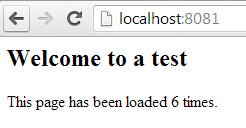
The above example when started and stopped a few times while also refreshing the page in a browser, should give a result similar to this:

In the Console

In the Browser

Tuesday, December 31, 2013

Javascript Loading Animation

Once upon a time I used to load all of my javascript in the head tag using script includes as the page loaded. Times are a changin', and now we have AMD devices such as RequireJS; Now I can write my JS in modules and load them as and when I need.

When loading all my JS on page load, I normally had some kind of UI control to indicate resources were being loaded. After having converted to RequireJS, this loading time has been divided into smaller more intermittent load times. The problem I've experienced is that sometimes a JS resource gets loaded really slowly, or perhaps it's just big or complicated. For whatever reason, it's not important.. The most important thing is to keep the user updated with whats happening, to have a responsive and active UI.

If a user clicks a button, which indirectly requires remote/new resources, then the response to that button click will only come to pass after RequireJS can download all the required resources. If this response time is too long, then this can confuse the user and/or lead to frustration. Actually,.. whenever I do any XHR or remote requests I want to have the same consistent active UI feedback telling the user what (or something) is happening.

Enter loading.js - A completely over-thought device to display feedback on your UI when it requires the user to wait. You can download all the code from GitHub or you can find a streamlined version of what you're looking for below.

I have tested in the current versions of Chrome (desktop & mobile), Firefox, IE, Safari (desktop & mobile). I don't have much intent in creating fixes for historical versions just yet,.. however I will happily accept pull requests.

Download

Example Usage

JQuery & RequireJS

JQuery & SeaJS

Mootools with no module loader

Tuesday, May 28, 2013

JSON Validator

For a while I have been developing a NodeJS web app ~ The entire app is service/ajax/socket driven and requires a lot of message passing. I quickly discovered I needed a convenient yet secure way to validate all messages arriving at the server. Enter JSONValidate.js
This one function can be used on both ends of my app to proactively (on the client) and reactively (on the server) bounce faulty data. I have been checking in on the JSON schema standard over the past three years, but I still wanted my schema to have a few more bells and whistles than what the standard was providing ~ So stick it for now, this works fine.

Download

If you're anything like me and don't want to read all my mumbo-jumbo, then you can just go ahead and view and download the code.

Schema Breakdown ~ Let's Build One

A schema is simply a JSON object with a set of properties appropriately named as desired object field names. Let's make a human schema.
var human = {
  name: { },
  birthday: { },
  weight: { },
  gender: { },
  deceased: { }
};
Now we can define type for each property.
var human = {
  name: { type: 'string' },
  birthday: { type: 'string' },
  weight: { type: 'number' },
  gender: { type: 'string' },
  deceased: { type: 'boolean' }
};
At this stage the schema would validate an object with four, non-null appropriately named properties. Let's throw in some extra boundaries and rules...
var human = {
  name: { type: 'string', min: 3, max: 120 },
  birthday: { type: 'string', regex: /^(19|20)\d\d([- \/.])(0[1-9]|1[012])\2(0[1-9]|[12][0-9]|3[01])$/ },
  weight: { type: 'number', null: true },
  gender: { type: 'string', min: 1, max: 1 },
  deceased: { type: 'boolean' }
};
  • All properties are assumed to be required (not null) unless so specified (like the weight property).
  • The regex property is used on string fields. The regex for birthday is simply a date regular expression in format yyyy-mm-dd.
  • min and max can be used on string and number types.
Next: we can define label and custom.
  • If a label property is defined and the object being validated fails, the validator will use the label property to describe the error.
  • The custom property allows for a custom function to be defined in the schema. The function will be given two parameters; the property value, and the object being validated, in that order. The custom function should return an array of strings in the event of data not passing validation; and simply return nothing if validation was successful.
var human = {
  name: { type: 'string', min: 3, max: 120, label: 'Full name' },
  birthday: { type: 'string', regex: /^(19|20)\d\d([- \/.])(0[1-9]|1[012])\2(0[1-9]|[12][0-9]|3[01])$/ },
  weight: { type: 'number', null: true },
  gender: { type: 'string', min: 1, max: 1
    custom: function(v) {
      if (['F', 'M'].indexOf(v.toUpperCase()) == -1) 
        return ['Gender must be set to F or M.'];
    } 
  },
  deceased: { type: 'boolean' }
};
The last two features worth mention: arrays and sub schemas are both supported as well. Let's add some pets to our human.
var animal = {
  name: { type: 'string', min: 3, max: 120 }
};

var human = {
  name: { type: 'string', min: 3, max: 120, label: 'Full name' },
  birthday: { type: 'string', regex: /^(19|20)\d\d([- \/.])(0[1-9]|1[012])\2(0[1-9]|[12][0-9]|3[01])$/ },
  weight: { type: 'number', null: true },
  gender: { type: 'string', min: 1, max: 1,
    custom: function(v) {
      if (['F', 'M'].indexOf(v.toUpperCase()) == -1) 
        return ['Gender must be set to F or M.'];
    } 
  },
  deceased: { type: 'boolean' },
  pets: { type: 'object', schema: animal, array: true, null: true }
};
* Recursive behavior is not yet supported. (sad face) The last code snippet above should validate positively on an object that looks like this:
{
  name: 'Victor Challis',
  birthday: '1982-12-14',
  weight: null,
  gender: 'M',
  deceased: false,
  pets: [
    { name: 'Alex' }, 
    { name: 'Pat' }
  ]
};
In case you didn't see it at the top, you can experiment with the validator on JSFiddle.net.