Tuesday, May 27, 2014

Reading Excel Files in Classic ASP

Recently I had the need to source data from Excel files in the old Classic ASP platform. There are some good resources online which can help you with this, but I thought I'd log my little experience here which may hopefully expedite the process for someone else someday :)

In my experience most people use VB script in their ASP environment,. the past few years I have grown to prefer using JScript. I'll provide my testing in both.

A Little Environment Preface

In my examples I will have a file called unlocodes.xlsx placed in the directory c:\temp\
The content of the Excel file looks like this:

ASP (VB)

Here is a barebones ASP sample connecting to the Excel file.

This resulted in:

ASP (JScript)

Here is a JScript sample connecting to the Excel file. In my current environment I never use serverside JScript to render HTML, rather only to serve in a JSON based API format. I trimmed down the scaffolding into the bare necessities: an Excel interface and a JSON polyfill that works in ASP JScript.

This resulted in:

Some Extra Notes

I crossed paths with two errors, both of which were resolved by simply choosing the correct connection string.
This error:
ADODB.Connection error '800a0e7a'

Provider cannot be found. It may not be properly installed.

and this error:
Microsoft JET Database Engine error '80004005'

External table is not in the expected format.

The ConnectionStrings.com website is a great resource for finding a connection string compatible with your installed version of Excel. I found that on my machine with Excel 2010 this connection string worked:
Provider=Microsoft.ACE.OLEDB.12.0;Data Source=c:\somefile.xlsx;Extended Properties="Excel 12.0 Xml;HDR=YES;IMEX=1";

Whereas on our production server we have 2013 installed:
Provider=Microsoft.Jet.OLEDB.4.0;Data Source=c:\somefile.xlsx;Extended Properties="Excel 8.0;HDR=YES;IMEX=1";

If you continue to have problems finding the correct driver, or it complaining it's not installed, then be sure to download and install the Microsoft Access Database Engine 2010 Redistributable. This includes the latest ACE drivers which come in 32 and 64 bit flavors. For posterity you may want to try install the 64bit version in command line using the follwoing syntax:
AccessDatabaseEngine_X64.exe /passive

Wednesday, May 7, 2014

Injecting CSS with Javascript

Why injectCSS? Why make it? What is it solving?

  • The primary goal was to create an easy way to include multi-line (lots) of CSS using Javascript.
  • Can reduce number of files in a JS plugin or project (My goal was one).
  • A test run at jsperf.com shows that injecting CSS rules for a vast number of elements is very fast.
There are already some existing CSS injection tools, but I wanted something dead-simple. There is a great library called VeinJS, which does so much more than mine in many different ways. But after perusing through the examples I knew that I would have to dismantle my CSS too much. What I wanted was something like what you will see in the example below.

Example Usage

With RequireJS

With no dependencies

Compatability

Tested successfully on:

  • Chrome (+mobile)
  • Firefox
  • Safari (+mobile)
  • IE 10+
Due to the older IE browsers not allowing the innerHTML property to be set on certain elements, this will not work in them.

Download

The code is on GitHub. Download, use and modify as you please.

Tuesday, April 15, 2014

The Curiosity of _blank Anchor Tags

I'm often curious how so many websites still serve anchor <a> tags with targets set to "_blank".

I recently started browsing through www.104.com.tw, and was horrified to see how many times I was forced onto a new tab. A quick analysis showed me that 43% of the links on my profile editing page had a blank target set. ermahgerd.

This leads me to wonder if this is a conscious decision of the 104 developers. As a user I am consciously deciding my target on every single mouse click on an anchor/link. If I want it open in a new tab, then I middle-click (or ctrl-click),.. the ability to choose a new tab vs. current tab has long been given to me and the rest of the users of the world,.. why would some websites still decide to try force the user to use a new target?

I ran the following snippet of Javascript over a small sample of websites (some from Alexa top 10, some drawn from a hat).
Resulted in this log of results, which I've tried to summarize below.

The average use of _blank targets per country looked something like this for my sample:

Now I understand my sample is small (<50 pages); Edge cases may be skewing the statistic, but I it's fairly evident that some countries are definitely more accustomed to closing browser tabs than middle-clicking their mouse.

The top 13 results from my sample (excluding search result pages) looked like this:


Looking past the fact the top few sites have such a huge ratio of _blank targeted links, it's amazing that on the landing page of these Chinese sites the links number in the order of thousands.

It was also interesting comparing Bing's, Yahoo's and ebay's localized sites across the countries in question. It seems these sites have tailored their UX appropriately for their market.

Bing

Yahoo

ebay

If I had time to do this again properly, I would like to automatically crawl a more substantial sample of sites. The manual nature of my data-capture forced my sample to be focused and probably unfit for using in any real diagnosis.

Here's a good article to read. Agree or disagree with the use-cases, either way I hope more developers choose to use blank or new targets more appropriately.

Monday, March 31, 2014

Collect - A PHP/JQM Mobile Framework

For nearly as long as I can remember, I've been trying to simplify my programming projects by breaking down long repetitive tasks down into as short and concise steps as I can. I shudder to think of the hours in my life spent putting together a web page that reads a list of items from a database, filters or transforms them, then renders out the appropriate html and attachments. So many times have I done this, across many languages, projects, and technologies.

For the past two years I've been reforming my interest in web, to an interest in mobile web. During this time, I've also run through all my regular distractions like creating a little mobile RSS reader, a mobile client profile database for a cousin, a mobile plumbing inspection checklist for another friend. All these very different projects have a lot in common. They need to capture, edit, delete and list objects. Throw in a little menu navigation and there you have a system. My goal with this PHP/JQM MVC project is to turn my dev cycle for small projects into 90% deciding what I want, 10% typing it in.

Now since I'm targeting mobile devices, form layout can simply default to a vertical list of form controls down the page. All that's really left is deciding what data needs to be captured in my simple data capture app. Here's an example set of definitions...

The Client Profile Demo

There are three object models there: A client, a client state, and a product. Clients have several details, among which is a state. They can be in only one state at a time. Clients can have many products. That may or may not look like a lot,.. but what does it get you?

  • Six tables in your database, three data tables, each with a respective log table tracking all changes
  • An API on the serverside to manipulate that data
  • Clientside forms to edit instances of each of the models
  • Some simple regex error detection in the forms
  • Overview and list pages to navigate the data
  • A dashboard to hold it all together
  • The login procedure and managing users are also thrown in already
Here's some screen grabs of the app produced by the above definitions:

Download and Setup

You can freely download, copy, hack and sell this project from GitHub. To setup your own mobile app, the general process is as follows:

  • Copy this project folder into your htdocs or respective web directory
  • Edit the app/schema.json file to define your models and views
  • Delete any existing app/database.sqlite files (if you want to start from a clean slate)
  • Open api/check.php in a browser. This will create any tables that don't exist
  • Now open your mobile web app in a browser window

Some Caveats

As per usual, I offer this simply as a mostly working prototype. I was actively working on this project more than a year ago, but since then time and priority has led to the inevitable disregard of maintaining it. I still use it often when I need a little admin panel for a website or project I'm working on. I find it workable, but there are definitely bugs, and features half baked in. Have fun with it.

Tuesday, March 4, 2014

PHP Image Server

One of my latest projects requires an image server which had to fulfill these two API requirements:

  • Storing: Accept a URL as an image source then provide a token to address the cached/stored image.
  • Reading: Accept a token to provide an image in a specified resolution and/or format.
Some secondary features required:
  • The read API should provide a method to crop and resize images.
  • For the purposes of my project, I require the machine to...
    • accept JPEG, GIF, PNG, and SVG
    • only serve JPG's
This image store facility is only going to be used by an automated robot, so no pretty human interface is required.

Download

The code is on GitHub. Download and modify as you please.

Basic API format

  • Storing:
    /store/secret-key/base64_encoded_URL
  • Reading:
    /key/token/size

Storing an Image

Calling the API with parameters something like this:

http://localhost/imagemachine/store/123/aHR0cHM6Ly91cGxvYWQud2lraW1lZGlhLm9yZy93aWtpcGVkaWEvY29tbW9ucy9iL2IwL05ld1R1eC5zdmc=
Where store is the action, 123 is the secret key to store images, and the last parameter is the base64 encoded result of "https://upload.wikimedia.org/wikipedia/commons/b/b0/NewTux.svg"
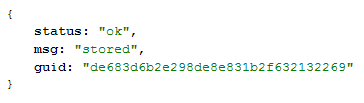
Should result in JSON looking something like this:
{
 status: "ok",
 msg: "stored",
 guid: "de683d6b2e298de8e831b2f632132269"
}
The above means that the imageserver has decoded the URL, downloaded it, saved it in JPEG format (configurable), and returned a key for you to address that image in the future. The key is simply a hash of the URL passed in.

Reading an Image

Calling the API with parameters something like this (using the token from above):

http://localhost/imagemachine/~/de683d6b2e298de8e831b2f632132269
Will return an image in the default size and cropping.
The read key in this example is simply set to a tilde (~) as security for reading images out of this store is of no concern. To specify a size/cropping scheme, append one of the predefined sizes as another parameter:
http://localhost/imagemachine/~/de683d6b2e298de8e831b2f632132269/s
Where s has been setup as a "small" version of the image.

Demo Settings File

My Experience on a Hosted Solution

I use the GridService product offered by MediaTemple for my hosting. I followed this article to get the ImageMagick PECL working. But ended up discovering that the extension was quite limited compared to the native console convert. So I fell back to using PHP's exec.